
Lesson 3: Creating the Perfect Resume
When employers are interested in hiring you, the first thing they’re likely to ask for is your resume (or CV). They’ll form an impression of you based on what they see at first glance, so it’s essential to get this right.
Many people are daunted by the prospect of preparing a resume, but don’t worry—it’s not that hard. There are many free resume builders online to help you, plus lots of free resume templates. For example, you probably have a Google account. So you can use any Google Docs resume template without charge. There are lots of them.
So what should you include in your resume, exactly? Good question...and the answer is ‘less than you think.’ Don’t make the mistake of cramming your entire life history into one document. A long, complicated resume is off-putting, and employers may never read it.
A short, concise resume is usually much more effective. One or two pages is best...three is the maximum. The document should be clear and easy to read so that employers can scan for the salient points.
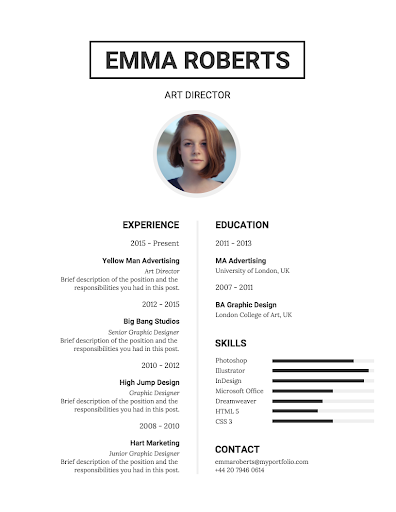
There are several different ways to structure a resume, but using reverse chronological order is probably the best. This is the format employers expect to see, so it will be easier to understand. In this format, you list your most recent positions at the top of the document. Then you work backward to your education.
Give the most space to your most recent jobs, highlighting anything relevant to your new live chat vocation. Remember that employers don’t care that much about your qualifications and trophies. They want the answer to one simple question—can you do the job?
Be sure to include your contact information at the top of the resume, with several ways to get in touch. Include phone and email as a minimum. But it’s good form to include your mailing address and one or two social media links.
Remember to include a photo, too. It’s hard to connect with a resume that’s just text on a page. But adding a picture brings you to life as a human being. That alone may set you apart. But your photo needs to look good. The drunken pic from your birthday party won’t cut it! You can get a friend to take pictures of you using a regular smartphone. That’s fine, as long as the lighting, dress, and pose look suitably professional.
Your profile photo doesn’t need to be boring, though. Potential employers want to see that you are a real human being who would be fun to work with. So ‘professional with a smile’ is a great way to go.

If you really want to get noticed, it’s a good idea to have a presence on LinkedIn, too. This is the social network for business, so you need to be active here. A good profile on LinkedIn is like an ‘online resume’ that works for you 24 hours a day. Get this right, and you may find premium clients contacting you out of the blue.
To succeed on LinkedIn, you need a first-class profile. You can use a similar approach to the one we’ve discussed for a regular resume. That means:
Be sure to make the most of every opportunity to improve your profile so that it stands out from the crowd.
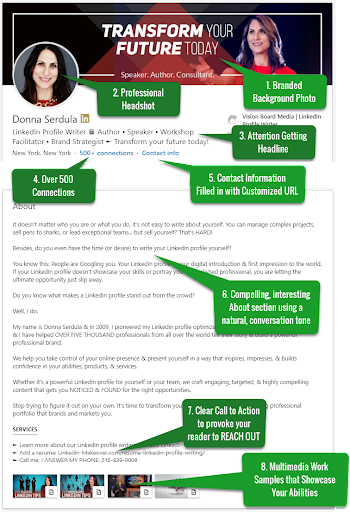
Get friends and colleagues to add skill endorsements and recommendations, too. You can also add documents that showcase your talents. Perhaps you’ve written blog posts, designed cool images, or edited videos. You can add them all to your profile to make a better impression.
Here’s an important tip. Update both your resume and your LinkedIn profile regularly. Add in your latest experience, and detail any new skills you have acquired. This way, they will both become more valuable in time and help you to upgrade to top-quality jobs.
Putting a professional resume together doesn’t have to cost you a cent. Showcasing your talents on LinkedIn is a free option, too. Invest a little time getting these right now. Your efforts will be repaid many times over.
Copyright © SocialSaleRep. All Rights Reserved.