
Lesson 5: Rocking Your Online Interview
When applying for live chat jobs, you will often be invited to attend an online interview, conducted over a video conferencing platform such as Zoom. This is nothing to worry about. In fact, it’s your chance to shine and stand out from all the other applicants.
The truth is that most people are not at all prepared for the new age of online interviews. They stumble their way through, making basic mistakes and coming across as disorganized and unprofessional. If you pay attention and apply what you learn, you will truly get noticed. From the get go, you will look and sound more professional. You’ll have a greater impact, and make a much better impression
First of all, we’re going to look at what you need to do before the interview, and how you can prepare for success. Don’t assume anything, because your interviewer may be assuming something completely different! You have to check all the details, to avoid any possibility of misunderstanding.
This starts with the time and date of the interview. When doing meetings online, it’s easy to get confused over time zones. The person interviewing you may be on the other side of the world, where both the time and date could be different. So when agreeing an interview time, double check that you are both on the same page.
Next you need to get the online event details. If the interview will be conducted using a video conferencing platform - like Zoom or Google Meet - ask for the meeting link and password. If you’ll be using a video chat system like Skype, ensure that you’re added as a contact in advance. You don’t want to be scrabbling for these details two minutes before the call starts.
Remember to ask whether the call will be conducted using video, or audio only. That will make a difference to how you prepare for the call, and help you get mentally ready. You don’t want to be sitting in your pyjamas expecting an audio call, only to log in and find yourself on video.
Get contact details you can use as a backup, in case of technical difficulties during the call. If something goes wrong, you must be able to chat with the interviewer and devise a Plan B.
Once you’ve attended to those details, it’s time to do some research. Most interviewees are badly prepared, and so they make a poor impression. Don’t make that mistake.
Take some time to Google your interviewer, or the organization they represent. You can learn an awful lot in a short time by reading a few blog posts and watching some YouTube videos. Read any briefing notes or information the interviewer sends you - it’s worth the effort.
Next, take some time to anticipate the questions you may be asked during the interview. Put yourself in the interviewer’s shoes - if you were them, what questions would you ask?
Think through these questions carefully, then practice your answers. The more rehearsed you are, the more likely you are to ace the interview.
Next we’re going to talk about setting up your interview environment, and how to present yourself professionally. Looking professional has always been important in interviews, but in the past, you only had to worry about your personal appearance. In the age of virtual meetings, you have to consider your environment, too.
If you appear on camera in a cluttered room with poor lighting and noises in the background, that’s going to create a negative impression from the get-go. So you need to work on all aspects of your setup.
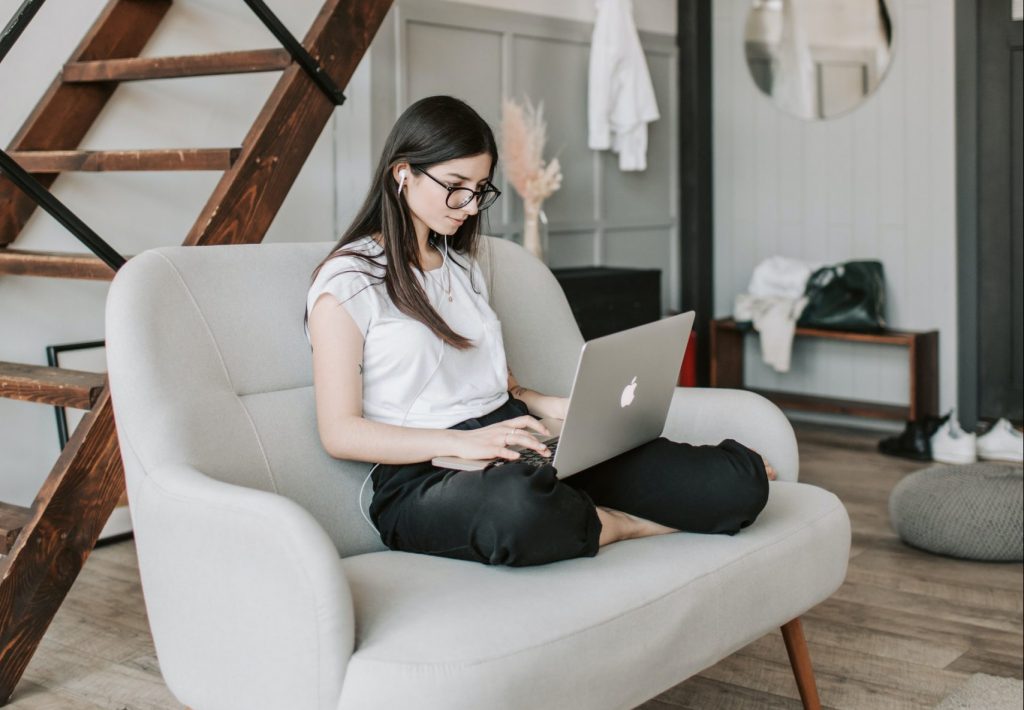
Let’s start with the location you will use for the interview. Find a room that’s quiet, and which allows you to create a professional-looking background. You want this to be simple and uncluttered, so move unnecessary objects out of the way. You must be the focus of the interview. Don’t allow your interviewer to be distracted by some strange object hanging on the wall behind you.
Your environment needs to be quiet, too. Ensure that no-one will interrupt you by barging into the room and walking into your background. If you have young children, ask someone else to take care of them. Pets can also be a problem. It’s not a good look to have your cat walking across your laptop keyboard and taking center stage on camera. And you don’t want your dog barking at the pizza delivery guy during your interview. So anticipate potential problems and make arrangements.
Check that your windows are closed, so you don’t get interrupted by cars backfiring in the street. Avoid using noisy fans or aircon units, especially if they’re close to your microphone. Another potential problem is an echoey room, especially if you have hard flooring. You can mitigate this by bringing extra pillows, blankets and even clothes into the room. Spread them out so they absorb the echo, whilst staying out of view of the camera.
Once your environment is looking and sounding good, it’s time to make sure you look good, too. As with any interview, you need to dress for success. You may be at home, but you still need to look professional. You can, however, be a little less formal than in regular interviews. If you’re a man, for example, you may decide to skip your suit jacket, but still wear a shirt and tie.
White clothing is best avoided, because it can white-out the camera, creating a bleached look. Stripes are also a no-no, because they may cause weird optical effects. Instead go for neutral tones such as grays or light pastels. These are generally safe, but check them against your background. For example, a brown shirt will be hard to see if your background is brown, wood panelling.
Now both you and your backdrop are looking good, so the final step is to check your lighting shows off both to advantage. This is another area where most people fail, but big improvements are easy to make. Your primary light source should be behind your camera, so that it lights up your face. If you can get natural light from a window, that’s great.
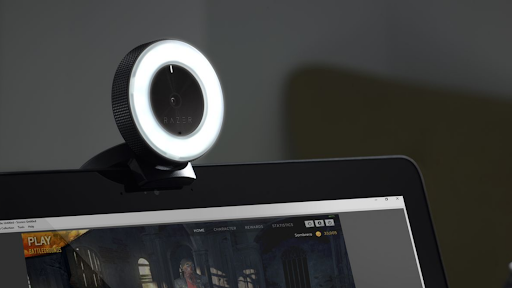
But a more flexible option is a ring light. You can buy these very affordably online, and they provide a light source designed to light your face in a favorable way.
What you do NOT want is a strong light source behind you, such as a big window. This will put you in shadow, and ruin all the hard work you’ve put into your appearance. Close the drapes or pull down the blinds to minimize this issue. Pay attention to these details and you will be on track to look great on camera and create a positive impression from the first moment of your interview.
Now let’s look at the biggest difference between in-person meetings and online interviews - the technology. We’re going to talk about:
We’re very lucky to live in an age where technology enables us to do amazing things. Even a few years ago, video conferencing was clunky and unreliable. But nowadays, it’s a fantastic communications tool. So first of all, let’s look at the technology you will use for the interview. In many cases, this will be decided by the interviewer. But often you will be able to suggest the tech platform to be used.
If that’s the case, try to avoid free messaging apps like Skype, Line, Whatsapp and Messenger. These are fine for talking to friends and family, but they are not reliable enough for important interviews. It’s always better to use video-conferencing apps like Zoom or Google Meet. They handle video better, are less likely to fail, and have far more features and options.
Next you need to decide what device to use. You should always choose a computer where possible, rather than your phone. A desktop computer is OK, but a laptop is perfect, as it provides the power you need, plus the flexibility to adjust the height and position.
Ensure that your computer has a full battery, and is also plugged into mains power. Video calls drain your battery fast, and you don’t want your computer to die halfway through the interview.
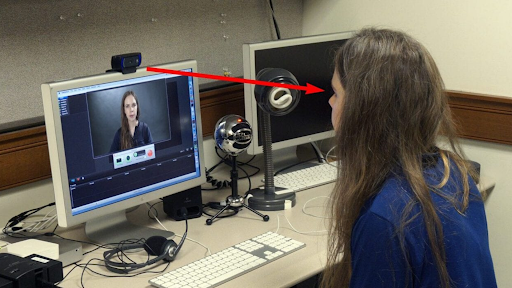
Remember that your webcam needs to be at eye level, otherwise people will be looking up your nose. So use books to raise your laptop until the webcam is level with your eyes. The webcam built into your laptop will do the job, but if you can upgrade to a higher-quality one, so much the better. Logitech has great webcams that improve not just the video quality, but also have good-quality microphones built in. For a small investment, you can really enhance how you look and sound during your interview.
For the best audio quality, however, you need a microphone that is dedicated to that job. Nowadays good mics are very affordable. A USB microphone like a Blue Yeti or Snowball is a great investment that will really help you level up your audio quality. Technology can be a challenge, but with a little work you can create a reliable setup that gets the job done well
You’ve made all your preparations, and now the day of the meeting is here. Let’s look at some strategies for making the best impression during the online interview itself.
As always, preparation is important. 30 minutes before the interview starts, double check your setup, especially your audio and video. Then eliminate all distractions. Close down all unnecessary apps or browser windows, and mute your phone. You don’t want your interview to be interrupted by notifications and messages from friends.
Have the meeting link and contact info to hand, to avoid a last minute panic. Have your resume and any other information nearby, plus some means of taking notes. Don’t wait until the last minute to join the meeting. Log in 10 minutes before the interview starts, so you have time to deal with any issues. You may be required to install a software plugin, for example, or download an app.
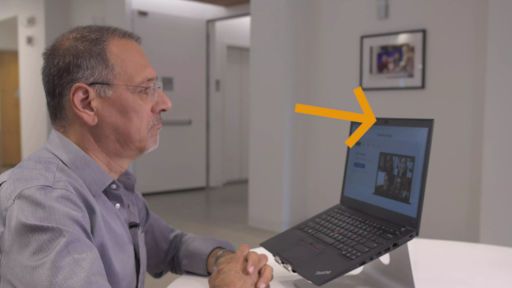
Once the interview starts, remember to look at your camera, not your screen. This is a very common mistake, and it definitely creates a negative perception. If you are looking at the video images on the screen, you will not seem to be making eye contact with your interviewer.
In particular, you may find yourself drawn to the video of yourself. So have a post-it note handy. If necessary, you can then use this to cover your own image, and eliminate that distraction.
Speak clearly, and ensure that your microphone is close to your mouth. If you have to mute yourself at some point, remember to unmute yourself next time you speak...it’s an easy mistake to make!
Most important of all, remember to smile! The downside of online interviews is that some of the connection you get face-to-face is lost. But smiling still works, and coming across as friendly and happy is always a good idea. If you implement these simple strategies, your online interview should go smoothly, and you will be a great success.
If you follow all the advice we’ve covered so far, you will be in good shape to be a great interviewee.
Copyright © SocialSaleRep. All Rights Reserved.